John Sample

Bits and Bytes
posts - 102, comments - 333, trackbacks - 17

Geocoding With SQL Server

Update: Sept 10th 2005:

The project has moved far beyond what is on this page. MySql s now supported and there is a new interface.
Please click here  to get the latest information.


THIS PROGRAM IS BEING UPDATED AND IMPROVED FREQUENTLY.
IF YOU WANT TO BE NOTIFIED OF UPDATES, SUBSCRIBE TO THE GEOCODING RSS FEED

Many of the scripts and tables on this page are outdated, please see the geocoding category for the latest versions.
There is now a beta installer.

With the release of the Google Maps API, I wanted to try out some mapping. This ended up being the fairfaxinfo.com project.
As nice as the Google API is, it does nothing to help with the hardest part of mapping: getting addresses translated into longitude/latitude.
The only free service I could find was www.geocoder.us, but I didn't want to rely on it being up/free forever. The code is available in PERL with a Berkley DB, but I would much rather chew on tinfoil than try and read someone else's perl code.
So, after much headscratching, fist pounding, key banging, debugging,  eye wateringly boring (but thorough) census documentation, and in general driving everyone around me crazy, I have finally managed to use the Tiger/Line census data and SQL Server to geocode addresses.

There's a lot of leg work to do up front to prep your db.
I tested random results against geocoder.us and they matched. Your mileage may vary.

COMING SOON: A program that automates the 5 gig census download, extracts the files and installs the db is almost finished. It should be up the week of Aug 10th.


Step 1: Load The Data
First, you'll need to get the Tiger/Line files for your county. You'll need your county's fips code which you get find here.
Download the zip file for your county, it will probably only be a couple of megabytes.
We're only going to use Type 1 and Type 2 files for now. I merged a few other types, but thats beyond the scope of this article.
Extract *.rt1 and *.rt2.

We're going to load these files into tables TIGER_01 and TIGER_02 respectively. I use a database called TIGER, so modify the later commands if you name your db something else.
The table definitions will match the file schema even though we're not going to use all the fields.
Here are the DDL files for TIGER_01 and TIGER_02.
Now we need to use the BCP utility to load the data.
Here are the format files I used: tiger1.txt tiger2.txt 

The census files have occasional weird junk that will break your tables, like characters in the address number columns, so you'll need to set the maxerrors and log the output if you want to fix them and reinsert the suspect records.
I suggest you make .bat files out of the bcp commands to save your fingers:

bcp_load.txt

The switches are case sensitive, so be careful. (-F means something different than -f).

Step 2: Create the Functions
Now that we've got the data, we're ready to create the Geocoding functions.
Most return a table containing latitude, longitude, zip, and TLID (the Tiger/Line key). This will be expanded in the future.

Most of the functions in the scripts are support calls, you only need to worry about four of them at the moment:
fnGeocode(
@DirPrefix varchar(2), *see the note below
@Number int, Number component of the address. ex: pass in 1234 to geocode 1234 Main St
@StreetName,
@StreetType,
@DirSuffix varchar(2), *
@ZIP, Optional. Pass in ZIP if known. Otherwise pass in -1
@StateFipsCode, Optional. Pass in FIPS identifier for state if known. Otherwise use -1
@StateCountyCode, Optional. Pass in FIPS identifier for county. Otherwise use -1
)
For the optional components, searches will only be performed if one of the following combinations is provided:
ZIP
FipsState
FipsState AND FipsCounty

*Take special note of the @DirPrefix parameter.
If you are geocoding the address 123 West Main St, you will need to call the function like this:
select * from fnGeocode('W',123,'MAIN','ST','',55555,-1,-1)
The census files store directional prefixes as one or two characters: N, S, E, or W, NW, SE, etc. Pass in an empty string if there is no prefix.
The @DirSuffix is the same concept just at the end of the address. Example: 123 Main St SW.

You will need to normalize your street types before calling the function. For example, Street needs to be passed in as St, and Road needs to be passed in as RD or you won't get a hit.
Select distinct from the TIGER_01.fetype column to get the possible values.

You can reverse geocode and get the closest node intersection with the next function:
fnReverseGeocode( 
@Longitude decimal(9,6),
@Latitude decimal(9,6)
)
Eventually this function will attempt to return the exact address. Right now you will get the street(s) and address range, but I'm not trying to guess the number quite yet.

To get the location where streets A and B intersect (which may be more than once):
fnGeocodeIntersection(
@DirPrefixA varchar(2),
@StreetNameA varchar,
@StreetTypeA varchar,
@DirSuffxA varchar(2),
@ZipA int,
@DirPrefixB,
@StreetNameB,
@StreetTypeB,
@DirSuffxB varchar(2),
@ZipB
)

The fourth function tries to find a location when the exact number isn't known. Addresses I had to geocode were usually given as 5600 block Main St.
Since we are searching a range of addresses the number has to at least theoretically exist on one of the chains. But if there is no address 5600 and the chain starts at 5601, you will not get a hit with the other functions. Use this query as a last resort:
fnGeocodeClosestAddress(
@DirPrefix varchar(1),
@Number int,
@StreetName,
@StreetType,
@DirSuffx varchar(2),
@ZIP
)

To install, you can use the following scripts. The release notes for the latest versions can be found here.
For the entire database (don't use for an upgrade unless you want to reload the data): Geo.All.05.txt
If you already have the database setup, use this script to update the functions: Geo.functions.05.txt


Now for an example of how the census data and Google Maps differ in their data.

This is an image of a complete street chain (mulitple type 1 and type 2 records) overlayed on Google Maps as a polyline:
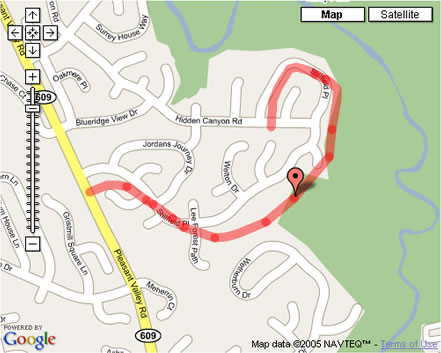

Notice that the marker is correctly positioned on the census data from which it was derived, but not on the Google road representation.
This one isn't that badly aligned compared to some I've seen.

In the next update I'm going to cover how to merge type 6 records into your data which provide more address ranges for type 1 records.

posted on Wednesday, July 13, 2005 11:00 AM

Feedback

# re: Geocoding With SQL Server

Works like a charm. Great work. I really didn't want to resort to PERL and the Berkley db.
7/14/2005 2:11 AM | Brian Ernesto

# re: Geocoding With SQL Server

I don't suppose you want to zip up the sql mdf file for the database and leave a link to it around here somewhere?
7/18/2005 10:13 PM | Mike

# Geocoding for the UK

Hi do you know of any uk geocoding?

There seems to be no free content out ther, or ami wrong?

thanks in advance

Adam
7/21/2005 4:42 AM | Adam

# re: Geocoding With SQL Server

Sorry, I don't know where to get UK data.
7/21/2005 8:36 AM | John Sample

# re: Geocoding With SQL Server

Fantastic implementation of he curved lines, I came here from the discussion groups...
7/21/2005 9:00 AM | drewfurgiuele

# re: Geocoding With SQL Server

Now that the curved line implementation is done, here are the next steps I'm working on:
1. Providing the FIPS county/state framework
2. Providing the address type normalization. (My code is specific to the process I use and probably won't help anyone else)
3. Address parsing
4. Point to point path finding

Thanks GK for all the geometry/math help!
7/21/2005 10:07 AM | John Sample

# re: Geocoding With SQL Server

A map of fairfax county drawn from census data:
http://www.johnsample.com/misc/geo/drawffx.jpg
7/21/2005 12:08 PM | John Sample

# re: Geocoding With SQL Server

I've noticed some major differences in the latitide and longitude returned by this versus Google. Using known addresses I've found that Google is the accurate one (which I would expect). Is this the result of bad tiger data, or math?
8/4/2005 1:59 PM | Greg

# re: Geocoding With SQL Server

It depends what you mean by major differences. Are you talking 100 feet or 100 miles?

The data Google's map images are derived from is likely the same data that is used to geocode. It doesn't matter what the inaccuracies are in their information, the markers for addresses will always appear correct when overlayed. (see the picture in the post)
Likewise, if you drew the maps with tiger data (which is something I'm working on) the results from google would appear incorrect when overlayed.
To see an example, browse around the hybrid mode. I'm sure you'll see plenty of places where the satellite data and the map wildly disagree.

Google's data is great for the most part, and its a shame we don't have access to it, but the biggest problem is trying to overlay apples on top of oranges. This is why I wouldn't say Tiger's data is bad... just different. It also contains a wealth of information not included in google if you know how to extract it.

I don't know about the math. I haven't had any complaints yet and its consistent with underlying data everywhere I've tested, but if you are seeing things that are waaaay off let me know.
8/4/2005 2:18 PM | John Sample

# re: Geocoding With SQL Server

Great job John!.

How can you get the geo code for a street that you don't know the number...something like Santa Monica Blvd, Los angeles, CA

I notice that even geocode.us does not return any value, however google and yahoo maps seems to know where to point the map.

Any ideas?

8/14/2005 2:29 AM | Pras

# re: Geocoding With SQL Server

John, do you mind sharing some insights on how the whole thing
works in theory or an simple example ? (relationship between
Tiger/Lines, address and longitude/latitude regardless technical
DB and programming issues) Thanks..
8/14/2005 2:41 AM | Jeff

# re: Geocoding With SQL Server

To grab an address with no number, you could just make a number up and pass it in to fnGeocodeClosestAddress().
You would need the FIPS55 data (which is in the installer) to change the city/state to a zip.

Jeff, let me see if I can make this short.
The tiger type 1 records contain a start lat/lon, end lat/lon, street name and address range.
Almost everything in the tiger type 1 records is split into left right sections, so instead of a column called zip you end up with columns called zipL and zipR.
Consequently you have 4 address range fields for each type 1 record:
start right
end right
start left
end left

If we ignore type 2 records for a second, the process goes something lke this:
1. Find a type 1 record where:
a. the name matches
b. the address is within the start/end left or start/end right ranges
c. the zip matches the left or right side of the street

2.Once you have that record you look at whether it lies on the left or right side of the street.
A best guess is taken depending on the odd/even parity of the start/end address range records.
If the left is 1010 through 1050 and the right range is 1011 through 1051, its a good bet that address 1031 lies on the right side of the road.

3. Get the ratio between the adddress you are looking for and the side of the street
For example, the ratio of address 105 on start 100, end 110 is 50%.

4. Get the latitude/longitude of the point at the above ratio on the start/end long/lat.


8/14/2005 9:17 AM | John Sample

# re: Geocoding With SQL Server

Hey, this all looks great. Is there a place I can go to to check out how to covert from SQL Server syntax to MySQL?
8/14/2005 3:12 PM | John Eckhardt

# re: Geocoding With SQL Server

There is a MySql version in progress. It should be up in about a week.
8/14/2005 4:56 PM | John Sample

# re: Geocoding With SQL Server

This might not be the appropriate forum for this question.

Is there anyway to color a specific zip4 area on a google map?
8/15/2005 4:07 PM | anon

# re: Geocoding With SQL Server

Canadian geo data? Does it exist like it does in the US?
8/20/2005 7:47 PM | Just asking....

# re: Geocoding With SQL Server

Sorry, I don't know of any free Canadian data.
8/21/2005 11:14 AM | John Sample

# re: Geocoding With SQL Server

Nice work John. I looked at the TigerLine PDF and you're a better man than I.
8/21/2005 3:52 PM | Peter Bromberg

# re: Geocoding With SQL Server

Awesome John. I checked out the beta installer. Downloaded and extracted fine, save a couple of timeouts. Had to check in on it every once in a while. What a timesaver. I created the tables and procedures as well, piece of cake (using SQL Server 2005 btw). But when I get to the data loading I get a file not found error. Any ideas? Im going to try to manually load the data. ALso, there is a popup on that screen that mentions selecting just certain files, where/how is that possible with this setup?

Ive been watching this site for a couple weeks now, thanks for your efforts.

Ill share future results.
8/22/2005 11:19 AM | Winter Park

# re: Geocoding With SQL Server

I think the "file not found error" is due to the installer not storing the correct bcp location. You should be able to fix it by opening the config.ini file and correcting the bcppath variable.
This should be fixed in the next version.
I've also seen the timeout, usually in the FIPS55 section.
I need to move the index creation out of the SqlClient call and into a command line call which has no timeouts.

8/22/2005 11:36 AM | John Sample

# re: Geocoding With SQL Server

Make sure when you change the var in config.ini you restart the program.

To selectively load states, you can change the temp path and place only those states which you wish to load underneath it. The path still needs to stay:
TempPath/State/.zips

I'm glad to hear it works in 2005, although from what I remember it has a 4 gig limit which isn't quite enough to load everything. You may want to remove some of the territories if you have issues (Puerto Rico, American Samoa, Guam, Mariana Islands)
8/22/2005 11:48 AM | John Sample

# re: Geocoding With SQL Server

I have a US zipcode table that has all the lat long state and county FIPS codes in it if anybody wants it, ita at the article from this link.
8/22/2005 1:39 PM | Peter Bromberg

# re: Geocoding With SQL Server

I changed the config value for the bcp path (80 to 90 was only change--sql 2005). The file not found error went away.

I am only doing 1 state for now for time purposes, your tip about the temp folder worked for selective loading. Selective downloading would be nice also.

If I go back later I will test the 4GB limit. I am confident it will work. There is a 4gb limit for SQL2005 express (msde equiv.), but I am using a fancier version I think (its the beta release).

I did get one other error when downloading/extracting FIPS.

This is what it said:

The operation failed because an index or statistics with name 'IX_FIP555' already exists on table 'dbo.FIPS55'.

I clicked OK and everything worked.

I tried the whole process again later and I did not get that error again.

I did CO for my state. For the BCP steps: It took 5-6 minutes to load the data. 1 minute to do the FIPS stuff (didn't have to download the 2nd time) and less than 1 minute to index.

Forward geocodes look to take 1-3 seconds, a bit longer than I expected.

I will report future findings.

This is great John, excellent work.
8/22/2005 5:49 PM | Winter Park

# re: Geocoding With SQL Server

Hmm, it shouldn't be taking that long to geocode.
With one state I wouldn't be surprised if you could get 100 a second. Thats about what I get in the VA only database.
If I get a chance I'll try it with sql 2005, maybe it handles indexes differently and it could be tuned up.

Thanks for for keeping me informed.
8/22/2005 6:16 PM | John Sample

# re: Geocoding With SQL Server

Nevermind about the speed. It takes that long using Visual Studio's Query tool. Connecting through query analyzer and presumably other methods is much faster. I did 10 lookups in what query analyzer reported as 0 seconds.
8/22/2005 11:53 PM | Winter Park

# re: Geocoding With SQL Server

I've downloaded the beta installer and during bulk copy I keep getting the error (The windows error reporting dialog) which says

BCP - SQL bulk copy tool has encountered a problem and needs to close. We are sorry for the inconvenience.

If I click 'Don't send' in the dialog box, it keeps continuing...I am not sure if all the data is copied correctly.

Any ideas?

thanks
8/23/2005 11:10 PM | Pras

# re: Geocoding With SQL Server

I haven't seen that error.
What you will see plenty of is invalid cast errors, but they should just scroll right past without stopping.
What OS and version of Sql Server?

8/24/2005 7:37 AM | John Sample

# re: Geocoding With SQL Server

For people searching for canadian data, www.geocoder.ca has done it so the data must be available somewhere... but maybe not free...
8/24/2005 8:28 AM | Jp

# re: Geocoding With SQL Server

John,

I am on WinXP and SQLServer 8 SP3.
The error message keeps on popping for every bcp command issued. It may be related to my OS or database Server version.

I was successfully able to import data using the scripts provided though.

Can you please publish the script to import the FIPS55 data?
It is currently in the installer but not the downloadable scripts.

thanks a lot.
8/24/2005 12:43 PM | Pras

# re: Geocoding With SQL Server

John,

If we do not specify a zip code to the function fnGeoCode,
it gives an error.

select * from fnGeocode('',2901,'Euclid','ave','',-1,-1,-1)

A cursor with the name 'c1' does not exist.

However, it returns values if the zip code is specified.

select * from fnGeocode('',2901,'Euclid','ave','',44115,-1,-1)

-81.668140 41.502452 44115 61111039

Am I missing any data to make this possible?

thanks for your help.
8/25/2005 2:50 AM | Pras

# re: Geocoding With SQL Server

Pras,
FIPS DDL -> http://www.johnsample.com/misc/geo2/fips-ddl.txt
FIPS FORMAT -> http://www.johnsample.com/misc/geo2/fips-fmt.txt

The valid combinations are ZIP, STATE, or COUNTY AND STATE, but I recommend always passing the zip. There are no indexes on state and county at the moment so if you are going to search that way make sure you add them.
8/25/2005 7:13 AM | John Sample

# re: Geocoding With SQL Server

What is the command for using BCP to load the FIPS data?

I used the Beta Installer to download all the data, but it kept timing out so I had to load the data manually.

So I have tables TIGER_01 & TIGER_02 loaded. Is that all I really need? The functions seem to work just fine.


Thanks for making this.

Shan
8/25/2005 9:47 AM | Shan

# re: Geocoding With SQL Server

Shan,

The functions don't use the FIPS table yet, they will in the next release.
The timeout probably occured during the indexing portion, so you may not need to bcp the data. If you have between 100 and 200 thousand records in the FIPS table you are good, just make sure you index it. You'll probably want a multicolumn index on place_name and state_alpha but it depends on how you want to use the data.
If the data didn't load just modify the bcp statements in the article to point to the correct table, format file, and data text file.

8/25/2005 12:20 PM | John Sample

# re: Geocoding With SQL Server

Thanks John!

I have all the data for the 3 states I wanted loaded in now.

Will there be the option of just using the following line of data:
123 MAIN STREET ANYCITY ANYSTATE 12345

Instead having to split up the data like so:
fnGeocode('W',123,'MAIN','ST','',55555,-1,-1)

8/25/2005 3:01 PM | Shan

# re: Geocoding With SQL Server

Yes, its coming.
8/25/2005 3:21 PM | John Sample

# re: Geocoding With SQL Server

I get a 407 Proxy Authentication Required when running the install. Would this be more on my end or maybe an issue with the download.

Thanks
8/26/2005 10:32 AM | Shawn

# re: Geocoding With SQL Server

Sorry for back to back reply's. I have downloaded my county rt1 and rt2 county files(jackson county, missouri).

Now when I run the bcp, table_02 loads fine but table_01 I get an error.

SQLState = S1002, NativeError = 0
Error = [Microsoft][ODBC SQL Server Driver]Invalid Descriptor Index


Any ideas?
8/26/2005 11:05 AM | Shawn

# re: Geocoding With SQL Server

The tables defined in the installer are different than the ones on this page.
You can use the installer OR the tables/format files on this page, but you can't mix and match.
8/26/2005 11:38 AM | John Sample

# re: Geocoding With SQL Server

This is great! Do you have any address parsing funcitons so I can pass in an address written in the format 'street, city, state, zip'. Thanks for all of your hard work on this.
8/28/2005 12:23 PM | Joel

# re: Geocoding With SQL Server

Ok, once I just manually did it and downloaded all the files on this page my load worked.

Thanks for the info
8/29/2005 9:02 AM | Shawn

# re: Geocoding With SQL Server

Re Canada: Check with Statistics Canada, per geocoder.ca

Worldwide (city/postal code -> lat/lon, at least): http://brainoff.com/geocoder/

8/30/2005 2:34 PM | Keith J. Farmer

# re: Geocoding With SQL Server

Nice work John. Does your downloader get the SE files, or the FE?

Also, I saw you're working on a mysql version. If there's anything I can do to help, please let me know.
9/7/2005 1:16 AM | jake olsen

# re: Geocoding With SQL Server

The new installer uses the second edition files and works with MySql:
http://www.johnsample.com/archive/2005/09/05/779.aspx

9/7/2005 8:23 AM | John Sample

# re: Geocoding With SQL Server

Can anybody post any sample vb.net or c# code to demonstrate how to use the geocode dll? I am a novice, so any sample would be helpful. Thanks!
10/13/2005 10:51 PM | Jerry

# re: Geocoding With SQL Server

Your beta program is great. The only problem is that it references the 2004 directory at census.gov, which isn't there (404) and cancels. You need to change the program reference to the 2005 link or allow user configuration of the url. www2.census.gov/geo/tiger/tiger2005fe/

-- Thanks
1/23/2006 7:32 PM | Rick

# re: Geocoding With SQL Server

John, and his wife just had a baby (congrats), so those of you who are wondering if he is still working on this project should keep in mind he is a little busy right now. Although I am impressed with this solution, I do have to question how accurate the data is. Case in point... I queried my in-laws address and then plotted the returned lat/long on Google maps and found the map marker to be about a block off from the true location of their house. I, like many others, also had trouble with the installer. The initial problems were a result of the change in the location of the census data. Using a hex editor I modified the install executable and pointed it to the right location. I did have other problems with install afterward, it would hang occasionally, but this was fixed with a restart of the installer. Overall a good effort and excellent application of census data. I just find myself questioning how usable it will be given that I haven't been able to prove how reliable the results are.
2/10/2006 1:57 PM | Mike

# re: Geocoding With SQL Server

Hi Mike. Keep in mind that the census data does not contain every US house address. Rather it contains ranges of addresses called "complete chains". I think this explains why it isnt more precise. Also, since we are talking about Census 200 info, some new addresses may not show at all.
2/13/2006 9:33 AM | Brian

# CONFUSED!!!!

I just came across your website and there is no question this tool can save lives. BUT, there are too man d*** links. Link here to go there, to come back and go here.

CAN YOU PLEASE SIMPLIFY THIS MESS????

1 PAGE with all the updates will do fine. If there are things that are outdated, get rid of them. I had to spend an hour readying all the posts just to get an idea on getting this thing to work.
3/13/2006 4:35 PM | .

# re: Geocoding With SQL Server

Yes, how inconsiderate of these people to do all this work and make it too hard for mr anonymous there to understand...
3/20/2006 9:11 AM | Carl

# re: Geocoding With SQL Server

i got the data in, and everything looks ok, but when i plot a poit in those points are out of the map. how do i test the function for reverse geocode
which lat and long do i use and what is the relation ship between rt1 and 2
5/26/2006 11:25 PM | david

# reg:merge statement in sql server 2005

iam getting "incorrect syntax near into" when i execute the below in sql server 2005.can i have a solution?


MERGE INTO MyTable
USING MyTempTable
ON MyTempTable.eid= MyTable.eid
WHEN MATCHED THEN
UPDATE sal= MyTempTable.sal
WHEN NOT MATCHED THEN
INSERT VALUES(MyTempTable.eid, MyTempTable.sal)
7/13/2006 8:40 AM | karthik

# re: Geocoding With SQL Server

First of all thank you John for doing all this work and letting everyone benifit
from it!

I have downloaded and installed the data into MySQL but I am a newbie at
DB programming and would really appreciate it if anyone out there
could translate the functions provided in SQL Server format to MySQL format?

Thanks again John for taking the time to read and understand all those TIGER documents.

7/27/2006 3:02 PM | Nick

# re: Install giving me 404 for remote server

Any new changes available?

8/4/2006 11:24 AM | Daks

# re: Geocoding With SQL Server

Great Work !!!!!

One question:
Does the current version support TIGER data 2006 First Edition ?
12/19/2006 1:12 PM | Victor

# re: Geocoding With SQL Server

sql server 2008 will fully support spatialdb - geospatial GPS
4/22/2008 1:56 PM | enterprise infosystems

Post Comment

Title  
Name  
Url
Enter the code you see:
Comment